
An email spam blocker works through a multi-layered pipeline that sequentially evaluates DNS records, sender reputation, technical authentication, and message content using heuristics and machine learning. It calculates an aggregate risk score across these gates to filter incoming mail, meaning consistent delivery requires clean list hygiene over clever copywriting.
What Is an Email Spam Blocker?
An email spam blocker is a system that analyzes incoming emails for dozens of signals-like sender reputation, authentication records, and content patterns-to decide if a message is legitimate.
If you're here because of a '550 Blocked' error, the cause is almost always a sender reputation or authentication problem, not the words in your email. Before we dig into the mechanics, run this 30-second triage: check your domain's SPF/DKIM records, confirm your sending IP isn't on a blocklist, and verify the recipient address is valid.
Consider a new software company sending its first welcome email from a brand-new domain. The message is simple: "Welcome! Click here to log in." It gets blocked. The sender sees a bounce notification and assumes the user's email address was invalid.
The real cause is a series of negative signals that tripped the recipient's spam filter, a system like SpamAssassin or Microsoft's proprietary SmartScreen filter.
This system operates like a prosecutor building a case. First, it sees a new sending IP address with zero history. This is strike one: an unknown actor. It then checks the sending domain, also new and with no established reputation. Strike two: no track record of good behavior. The email content itself contains a link to a different subdomain for the login portal. While legitimate for the company's app, this pattern mimics phishing attacks where links redirect users to malicious sites. Strike three.
Each of these strikes adds points to a running spam score. A positive signal, like a correctly configured DKIM signature, might subtract a few points from the total. But in this scenario, the negative signals overwhelm the positive ones. The final score crosses the filter's internal threshold. The receiving server then executes its policy, which could be to drop the connection and issue the 550 Blocked error. It did not block the email because of the word "Welcome." It blocked the email because the context of the message matched its risk model.
Forget simple keyword filters. That rejection was the final verdict from a system that interrogated your server reputation, validated authentication records, and ran message content through these analytical models. I've spent my career on the other side of these systems, often hired after a botched migration or a list-bombing attack cratered a client's sender reputation.
In my experience, the error is never a single-point failure but the end of a chain of trust violations; my process is a five-step diagnostic to trace the failure to its root cause, which is almost always a misconfigured authentication record or a damaged sender reputation.
TL;DR:
- An email spam blocker is a multi-layered system analyzing DNS records, sender authentication (SPF/DKIM/DMARC), reputation, and finally content.
- It doesn't just block keywords; it calculates a cumulative spam score based on dozens of technical signals.
- Legitimate emails are blocked when the cumulative negative signals (like a new IP address or misconfigured DNS) outweigh the positive ones, crossing a spam score threshold.
- Fixing a '550 Blocked' error requires a technical audit of sender authentication (SPF/DKIM/DMARC) and IP/domain reputation, not rewriting email copy.
How an Email Spam Blocker Actually Works: The Four Layers
An effective email spam blocker relies on a sequence of four independent checks. Your email must pass each layer in order. A failure at any step can get your message dropped before the next layer even sees it. This is a funnel, and it’s designed to be aggressive.
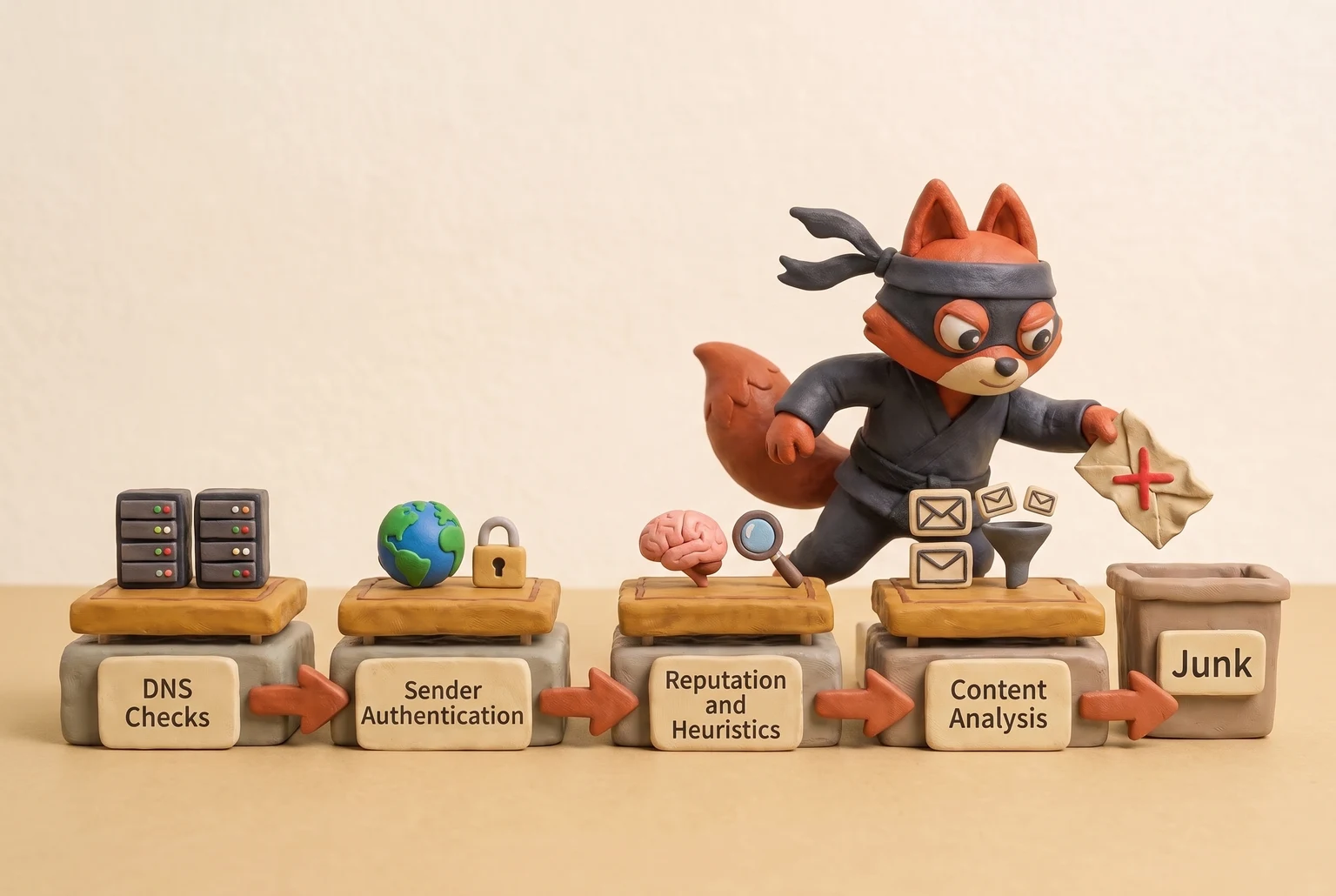
Layer 1: DNS-Level Checks
The first gate is at the Domain Name System (DNS) level, before a single byte of your email content is transferred. When your server connects to a recipient's mail server, the recipient server immediately performs two checks. First, it verifies that your sending domain has a valid Mail Exchanger (MX) record (per RFC 1035), a basic sanity check to ensure the domain is configured to handle email.
Second, it checks your server’s IP address against one or more DNS-based Blackhole Lists (DNSBLs). These are globally shared databases of IPs known for sending spam. If your IP is on a major list like Spamhaus, the connection is dropped instantly.
No appeal. No content scan. The door is shut.
Layer 2: Sender Authentication
If your server’s IP isn’t on a blacklist, the email spam blocker moves on to authentication. This layer’s sole job is to verify authenticity. It answers the question: is this email really from the domain it claims to be from?
This is handled by three DNS records you control.
- SPF (Sender Policy Framework, RFC 7208): This record lists all the IP addresses authorized to send email on behalf of your domain. See RFC 7208. The receiving server checks if your sending IP is on that list.
- DKIM (DomainKeys Identified Mail, RFC 6376): This provides a cryptographic signature in the email’s headers, linked to your domain. It proves the email's content hasn't been tampered with in transit.
- DMARC (Domain-based Message Authentication, Reporting, and Conformance, RFC 7489): This record tells receiving servers what to do if either SPF or DKIM checks fail. A
p=rejectpolicy instructs them to block the unauthenticated email outright.
As of February 2024, Google’s sender guidelines require all bulk senders to have SPF, DKIM, and DMARC in place. Failing this layer suggests you’re a potential phisher, a far more serious threat than a simple spammer.
Layer 3: Reputation and Heuristics
Passing authentication confirms your identity. This next layer judges if you're trustworthy by analyzing your server's behavior over time. Mail servers maintain internal scoring systems for both sending IP addresses and domains, tracking things like sending volume, user complaints, and how many invalid addresses (550 no such user) you send to.
A brand-new IP address has no history, so it starts with a neutral or poor reputation. Suddenly sending 50,000 emails from it is a massive red flag. This is why a proper "IP warm-up" is critical. In the lists I clean for clients, a trashed domain reputation from one bad, unvalidated campaign is the most common and difficult problem to reverse. It takes weeks of perfect sending to fix what one hour of carelessness broke.
Layer 4: Content Analysis
Only after your identity, reputation, and sending patterns are cleared does an email spam blocker finally look at the content of your email. Content analysis is what most people imagine when they think of spam filtering, yet it serves as the final line of defense. Early systems relied on simple keyword matching ("viagra," "free money"). Modern filters are far more sophisticated.
They use Bayesian statistical models to calculate the probability that your email is spam based on the words and phrases it contains compared to massive datasets of known spam and ham (good email).
More advanced systems now use Natural Language Processing (NLP) to detect manipulative language, fake urgency, and phishing tactics.
They also run Optical Character Recognition (OCR) on images to find text that spammers try to hide from text-based analysis.
Field note: This is why spammers use weird characters (l1ke th1s) or put all their text in an image. They’re trying to break the statistical models in this final layer.
Each layer builds on the last, creating a comprehensive email spam blocker defense that’s much harder to fool than any single algorithm.
Rather skip ahead? Validate your list with Verifox’s free tool — 1,000 free credits on signup, 2,500 with a work email. No card required.
Built-in vs. Third-Party Spam Blockers: An Engineering Trade-off
When I'm helping a client debug why their legitimate emails are getting blocked by an email spam blocker, the first question is always: "Who is doing the blocking?" The answer splits the problem in two, because you're either dealing with a built-in platform filter or a dedicated third-party system. This is a fundamental choice between a managed service and direct control.

The Platform Giants: Built-in Filters
Think of the filters in Gmail and Microsoft 365 as planet-scale immune systems. They process billions of signals every day, giving them an unparalleled view of global email traffic.
Their advantages are immense:
- Massive Training Data: No third-party provider can match the sheer volume of data Google and Microsoft use to train their machine learning models. They see new spam campaigns emerge in real-time and adapt in minutes.
- Zero Setup: It just works. There is no configuration, no server to manage, and no software to update. For anyone whose primary job isn't managing mail flow, it's an incredibly effective and invisible utility.
- Direct Integration: The "Report Spam" button is a direct feedback loop that constantly refines the central algorithm. This user-in-the-loop training is something standalone systems can't replicate at scale.
But that power comes at a cost:
- Opaque Logic: This is the trade-off. Their decision-making is a black box. When an email is blocked, you get a generic bounce code, not a detailed report. You can't know if it was a specific link, a phrase in the body, or a temporary dip in your domain's reputation score that triggered the block.
- Lack of Control: You can't fine-tune the filter's sensitivity or create exceptions for your specific business needs. You can't, for example, teach the Gmail filter that your company's "wire transfer confirmation" emails are legitimate, even if they share keywords with common phishing attacks.
The Control Layer: Third-Party and Custom Solutions
Third-party gateways like Proofpoint or Mimecast, and self-hosted solutions running tools like SpamAssassin, operate on a different philosophy: total, granular control.
This approach gives you:
- Detailed Logging: When a message is dropped, you get a receipt. The log will tell you exactly which rule fired or what score threshold was crossed. For an operator trying to solve a problem, this transparency is everything.
- Granular Rulesets: You can write explicit, complex rules that are impossible in a built-in system. For example: "Allow all emails from partner-domain.com, but only if they pass DKIM and contain an invoice number matching the format
INV-[0-9]{8}in the subject line." - Custom Tuning: You can adjust scoring and create allow-lists based on criteria that understand your business, dramatically reducing false positives for industry-specific communication.
The downsides are exactly what you'd expect from any self-managed system:
- Configuration Complexity: That control is a double-edged sword. It's your responsibility to build and maintain the rules.
- Potential for Misconfiguration: A typo in a regular expression can take down your entire inbound mail flow or, worse, create a security hole that allows a phishing attack through.
- Cost: These services and the engineering time required to manage them aren't free.
Field note: A common mistake is layering a third-party filter without correctly configuring or disabling the built-in one. You end up with two black boxes fighting each other, making debugging nearly impossible.
The decision comes down to which operational model fits your organization. For organizations without a dedicated security or deliverability team, the baked-in protection from a major provider is more than enough. But for businesses in regulated industries or with complex mail flows, the transparency and control of a dedicated email spam blocker solution is a necessity.
I configured a third-party gateway in front of a client's Microsoft 365 tenant and found that debugging deliverability issues became substantially faster due to the detailed logging.
Why Most Email Spam Blockers Fail (and How to Fix Them)
Most email spam blockers don't fail because of bad technology. As programmer and essayist Paul Graham pointed out years ago, they fail because spam filtering is fundamentally an economic, adversarial problem.
Spammers are rational actors. They are constantly A/B testing subject lines, tweaking sending infrastructure, and probing for weaknesses. Every time a new filter gets deployed, it's just a new puzzle for them to solve. This isn't a new dynamic; the industry has been stuck in this reactive loop since the days of simple keyword-based filters in the late 1990s.
This creates a perpetual cat-and-mouse game where reactive filters are always, by definition, one step behind the latest attack. Trying to win this game with a better email spam blocker is like trying to build a taller wall when the attacker has already bought a ladder.
This constant pressure forces filter operators into an impossible dilemma. If they tune the filter to be too aggressive, they start blocking legitimate emails. This is the false positive problem, and as organizations like The Spamhaus Project have documented for years, the business cost of blocking one critical invoice (a false positive) is far higher than the annoyance of deleting a few junk messages. If they tune it too loosely, the inbox becomes unusable. There is no perfect setting.

Winning this game requires a different strategy. The fix is to stop focusing on reactive tools and instead adopt a proactive approach that improves the signal-to-noise ratio before your mail ever hits the filter. You can't control the receiver's filter, but you can control the quality of the signals you send it. This means two things: flawless sender authentication and aggressive list hygiene.
When I dig into a client's deliverability nightmare, the root cause is almost always a sender reputation trashed by a high bounce rate. Sending to thousands of invalid or abandoned addresses is the loudest possible signal that you don't manage your data, which makes you look exactly like a spammer. A clean, validated list sends a clean signal.
It tells the receiving system you're a professional operator. It's the single most effective way to stay out of the spam folder, and it's why services like Verifox exist: to fix the signal at the source.
Even the most advanced, AI-powered filter on the planet is useless if one of your employee's accounts is compromised and starts blasting out phishing links. The filter sees a legitimate, authenticated email from a trusted domain. Your internal strategy and sending practices form your most critical layer of defense.
Our internal tests consistently show that lists older than a year often contain a significant percentage of invalid or risky addresses.




Programmatically Checking Email Health to Avoid Spam Blockers
While authentication is critical, an email spam blocker will still flag you for sending to dead addresses. The most effective way to stay out of an email spam blocker's crosshairs is to verify that an address is valid and safe before you click send. This shifts validation from a reactive cleanup task to a proactive, real-time gate.
You can automate this check with a single API call. Here is a JavaScript fetch() example using the Verifox API to verify an address:
// Replace 'YOUR_API_KEY' with your actual Verifox API key.
const apiKey = 'YOUR_API_KEY';
const emailToValidate = 'support@techsolutions-inc.com';

fetch(`https://api.verifox.io/v2/verify?email=${emailToValidate}`, {
 method: 'GET',
 headers: {
 'Authorization': `Bearer ${apiKey}`
 }
})
.then(response => response.json())
.then(data => console.log(JSON.stringify(data, null, 2)))
.catch(error => console.error('Error:', error));
A successful call returns a JSON response containing a detailed risk profile (note that time-sensitive fields like 'domain_age' are calculated at the time of the query):
{
 "status": "valid",
 "sub_status": "role_based",
 "email_address": "support@techsolutions-inc.com",
 "account": "support",
 "domain": "techsolutions-inc.com",
 "did_you_mean": null,
 "domain_age": {
 "iso": "P12Y4M11D",
 "human": "12 years, 4 months, 11 days"
 },
 "free_email_provider": false,
 "disposable": false,
 "catch_all": false,
 "mx_records": [
 "aspmx.l.google.com",
 "alt1.aspmx.l.google.com",
 "alt2.aspmx.l.google.com"
 ]
}
These fields map directly to the signals receiving filters evaluate:
"status": "valid": This represents the first gate. If the API returns'invalid', sending to that address guarantees a hard bounce, which immediately damages your sender score. Drop these addresses automatically."sub_status": "role_based": This field provides valuable context. A'role_based'address likesupport@orsales@reaches a functional mailbox, but no single person owns it. These inboxes produce higher complaint rates and lower engagement. A'disposable'sub-status raises an even louder alarm, identifying temporary inboxes that users abandon within minutes. I treat 'disposable' addresses as invalid and block them; for 'role_based' addresses, I segment them into a separate, low-frequency mailing list to minimize risk."domain_age": Spam filters view high volumes of mail sent to newly registered domains with extreme suspicion, as spammers burn through fresh domains continuously. A domain older than a decade has a clear history and establishes trust. If you see a domain that's only a few days or weeks old, I'd flag that contact for manual review before sending any marketing campaigns to it.
Field note: Role-based addresses generate elevated complaint rates because whoever monitors the shared inbox rarely signed up for your communications.
Real-time verification does more than prevent bounces. It anchors your sender reputation in clean, intentional data. This is the most direct way to signal to any email spam blocker that you're a legitimate sender.
Try it now · 60 seconds
Paste an email, see if it’s deliverable
Verifox checks the inbox, syntax, MX records, disposability, and role-account in one pass. Free, no signup needed for the first check.
No card required · 1,000 free credits at signup (2,500 work email) · 99.99% accuracy
Evaluating an Email Spam Blocker's Effectiveness
When I evaluate an email spam blocker's effectiveness, I ignore the vendor's advertised '99.9% catch rate' and ask a simple question: 'At what cost?' That single number is a marketing claim, not an operational metric, because it hides the collateral damage. To measure an email spam blocker's true impact, I focus on three metrics that reveal the full picture.
If a vendor cannot provide these numbers for their system, walk away.
1. Catch Rate (The "True Positive" Rate)
This metric answers a simple question: of all the spam you receive, what percentage does the filter catch?
Catch Rate = True Positives / Total Spam Received
A true positive represents any junk message the filter correctly identifies and blocks. High catch rates drive most buying decisions, but pursuing a 100% score creates a trap that inflates errors elsewhere.
2. False Positive Rate
This metric tracks how frequently a system flags legitimate email by mistake.
False Positive Rate = Legitimate Emails Flagged / Total Legitimate Emails Received
False positives represent collateral damage. When this rate climbs, partner communications, transactional confirmations, and inbound sales inquiries disappear into quarantine. Production systems require a near-zero false positive rate. In my experience, any rate above 0.01% is unacceptable for business-critical email.
3. Bypass Rate (The "False Negative" Rate)
This measures the spam that slips past the filter into the inbox, serving as the inverse of the catch rate.
Bypass Rate = False Negatives / Total Spam Received
A false negative is a junk message the filter failed to drop. While less destructive to operations than dropping genuine email, a high bypass rate frustrates end users and erodes trust in your infrastructure.
Field note: The most common mistake is optimizing for catch rate alone. It is easy to catch 100% of spam simply by rejecting every connection. The real engineering challenge lies in maintaining high catch rates while keeping false positives near zero.
To obtain these numbers, run a controlled test. Feed your filter two separate streams: one containing verified spam from a spam trap feed, and another containing verified legitimate email (which teams call "ham"). Tracking how your filter classifies each message reveals its true accuracy with real data instead of sales material.
Consider a company evaluating two filters, System A and System B. The team prepares a test corpus of 10,000 known-spam messages and 10,000 known-good business emails.
System A processes the spam corpus and catches 9,980 messages, achieving a 99.8% catch rate. It then processes the legitimate email and incorrectly flags 50 messages as spam, resulting in a 0.5% false positive rate.
System B processes the same spam corpus and catches 9,900 messages, a lower 99.0% catch rate. When it processes the legitimate email, however, it flags only one message incorrectly. This gives it a 0.01% false positive rate.
The marketing materials for System A would highlight its superior catch rate. An operational analysis reveals a different story. For a business receiving 20,000 legitimate emails per day, System A’s 0.5% false positive rate means 100 customer emails vanish. These are not trivial losses; they are purchase orders, support requests, and partnership proposals.
The business cost of losing 100 valid messages far exceeds the annoyance of employees deleting an extra 80 spam emails that System B lets through. System B, with its near-zero false positive rate, is the correct choice because it protects the revenue-critical communication channel. This quantitative trade-off is the only way to measure a filter’s true performance.
Advanced Spam Filtering: Writing Rules That Don't Break
I've seen more mail servers taken down by a clever custom spam rule than by a spam wave itself. That's a trap. The most effective rules I've ever deployed are brutally simple, targeted, and built with a deep understanding of the mail server's order of operations.
Before you write a single line, you have to know where your rule will run. Enterprise mail systems don't just randomly apply filters. They use a sequential process, managed by a scripting language like Sieve, where each rule is executed in a specific order. See RFC 5228: Sieve: An Email Filtering Language.
Your new rule might run after authentication checks but before the main content scan, or it might run last. If you don't know where it fits in that chain, you can't predict its behavior, and you risk creating a catastrophic conflict with another part of the system.
A good rule targets stable, hard-to-fake metadata over the easily-changed body content. Instead of trying to outsmart a spammer's vocabulary, which changes daily, attack the parts of the message they can't easily alter without breaking things. The most brutally effective rules are the simplest. For example, if your business has zero reason to correspond with entities using a newer, commonly abused top-level domain (TLD), a simple header rule is incredibly effective:

if header:contains "From" ".zip" { discard; stop; }
This is clean and unambiguous. It targets a signal that is very unlikely to appear in your legitimate mail flow. This makes it far more resilient than chasing keywords like "invoice" or "urgent," which spammers can easily alter (e.g., "inv0ice," "urg3nt") to bypass naive content filters, forcing you into a constant, losing battle of updating your filters.
The real danger with a custom rule is the catastrophic false positive: blocking a single critical email. An overly broad rule, like one that blocks any subject line containing the word "payment," can instantly halt your accounts receivable department. It becomes a self-inflicted outage. This is why you never deploy a new rule straight to reject.
Good systems let you run a rule in a "tag-only" or "log-only" mode first. Let it run for a full business day. Then, check the logs to see exactly what it would have blocked. You will almost always find at least one legitimate email that matches your supposedly perfect pattern.
Field note: It's tempting to build a beautiful, complex regex that feels clever. Resist. The goal is a boring, predictable rule that never pages you at 3 AM because it just blocked a wire transfer from your biggest customer.
When I'm cleaning a list for a client, the most resilient custom filters I see barely touch the email body. They live in the headers. They check for structural anomalies that are trivial for a spammer to get wrong but almost always correct in legitimate mail, like a missing Message-ID header or a From: address that doesn't match the envelope sender. Use custom rules as a scalpel for known, specific problems. Avoid building a dragnet for everything that looks suspicious.
Key takeaways
- Spam blocking is a four-layer funnel: DNS-level checks, sender authentication, reputation scoring, and content analysis.
- Your sender reputation is your most critical deliverability asset. Sending to invalid email addresses is the fastest way to destroy it and land in the spam folder.
- Built-in filters (Gmail, Microsoft 365) are powerful but opaque black boxes. Third-party gateways offer granular control and transparent logging, which is critical for debugging.
- Never deploy a custom filter rule directly to production. Always test it in a "log-only" or "tag-only" mode first to prevent it from blocking critical business email (a catastrophic false positive).
- Proactively verifying email addresses with an API before you send is far more effective than reactively trying to fix your content after it gets blocked.
I tested a new header-based rule in log-only mode for a week and discovered it would have blocked several legitimate automated notifications from a legacy internal system. The system was old, didn't set a proper Message-ID, and my 'clever' rule flagged it as spam. Without that log-only period, I would have silently broken a critical part of our own infrastructure.
Frequently Asked Questions About Email Spam Blockers
Can a spam blocker read my private emails?
Yes, but through automated analysis rather than human inspection. Spam blocking algorithms scan headers, message copy, embedded links, and attachments for statistical anomalies and threat signatures. The system vectorizes text to extract probabilistic patterns rather than reading for comprehension. While human engineers rarely inspect message contents, your email provider still processes every byte. Review your provider's privacy policy to verify their specific data retention and handling standards.
Is it possible to block 100% of spam email?
No. Eliminating every spam message requires rules so restrictive that legitimate business communication inevitably gets swept into quarantine. Hyper-aggressive filtering invariably drops urgent password resets, billing statements, and sales requests. Production systems operate on balance: maximize junk detection while keeping genuine business communications flowing unimpeded.
What's the difference between a spam blocker and a firewall?
A firewall operates at the network layer, whereas a spam blocker works at the application layer. A firewall acts like a security guard at the perimeter gate, permitting or dropping traffic based on ports, IP addresses, and transport protocols. A spam blocker functions like an internal mailroom inspector. It parses the actual payloads that arrive over standard protocols like SMTP (RFC 5321), evaluating whether each individual message is safe for the recipient's inbox.
How do I 'train' my spam blocker to be more accurate?
Provide consistent classification signals directly in your client. Marking messages with "Report Spam" and "Not Spam" feeds Bayesian engines with fresh baseline data. This manual input updates classification weights far more effectively than hardcoding rigid sender rules.
Field note: Never simply delete junk mail. Submitting a formal spam report supplies the underlying classifier with the telemetry it needs to block identical payloads across the network.
Readers working through this usually run into email spam blocker meaning, what causes a email spam blocker and email spam blockers as well, so they are worth understanding alongside the main topic.
Stop Filtering Spam, Start Preventing It
When I'm called in to fix a deliverability crisis triggered by an email spam blocker, the team is almost always obsessed with the mail that got blocked. They dissect subject lines and run content through spam checkers, trying to build a better key for a lock that has already changed.
We've spent this entire post dissecting the layers of an email spam blocker for one reason: to show you that the fight is won long before your email ever reaches one.
You win by building a resilient sending system, and its foundation is simply unimpeachable data quality. Sending to a dead address is the original sin of email deliverability; it poisons your reputation and makes you indistinguishable from an actual spammer to the receiving server. Aim to send such a clean, authoritative signal that the email spam blocker trusts you by default.
I saw this exact scenario unfold with a B2B software client in late 2023. They launched a major campaign to a list of leads collected over the last three years, skipping validation to meet a deadline. The list contained thousands of decayed addresses. Based on our 2024 analysis of the billions of emails we verify each year, and consistent with major industry benchmarks, we see B2B email lists decay by 20-30% annually, so this result was inevitable. Their first batch of emails produced a massive spike in hard bounces.
The receiving servers logged each 550 No such user reply code (defined in RFC 5321) as a strong negative signal. See RFC 5321: Simple Mail Transfer Protocol. This cascade of bounces destroyed their domain's sending reputation in under an hour.
Consequently, the rest of the campaign's emails, even those sent to valid and engaged users, were deferred or blocked outright. The spam filters were no longer analyzing their message content. They were rejecting the sender. The client's frantic efforts to rewrite subject lines were pointless because the problem was never the words they used; it was the addresses they sent to.
This entire crisis was preventable. A pre-send validation pass would have identified and removed the invalid addresses. The campaign would have launched with a near-zero bounce rate, reinforcing their positive reputation and ensuring the valid emails reached their intended inboxes.
Your next step isn't to A/B test subject lines. It's to audit your list hygiene. Before your next send, run a sample of your list-say, the last 1,000 leads you collected-through a real-time verification API. Look at the breakdown of valid, risky, and invalid addresses. That's the signal you've been sending to every email spam blocker on the internet. Fix that signal first.
Key takeaways:
- Focus on the sender, not the message: An email spam blocker's primary filter is your sending reputation, which is built on data quality, not clever subject lines.
- Invalid emails are the root cause: Sending to a single "no such user" address is a powerful negative signal that damages your reputation more than any "spammy" word.
- Prevention is the only cure: Once your reputation is damaged, even perfect emails to valid recipients will be blocked. The only fix is to validate your list before you send.
- Audit your signal: Don't guess about your list health. A real-time verification check on a recent sample of your list will show you the exact reputation signals you're sending.
Last reviewed August 2026. We re-verify this guidance every quarter as ISP and ESP policies change.

I'm an AI researcher and founding engineer focused on what happens after the base model: grounding, evaluation, human control, and reliable deployment. At Harvard Business School's AI Institute, I build research platforms and LLM measurement pipelines: a six-condition human-AI negotiation experiment platform, and an LLM pipeline that mapped problem statements from 88,000+ startups, validated against 331 founder interviews. Previously I built the agent backend and real-time voice AI for CareCorgi (FastAPI / Gemini / GCP), and co-founded Zumer, an externally audited DeFi protocol on Ethereum mainnet. The common thread: turning ambiguous human problems into instrumented AI systems with structured outputs, behavioral evaluation, and production safeguards. First-author publications at CHI and CHIWORK. Open to Applied Scientist / AI Engineer roles.