
SMTP still powers every marketing email, and it isn't the deliverability culprit. Your inbox placement depends on SPF, DKIM, and DMARC, a clean verified list, and sender reputation, not the protocol itself. Configure relays correctly, monitor blacklists, and validate addresses before sending.
What Is SMTP Email Marketing?
SMTP email marketing is sending campaigns through the standard protocol every mailbox accepts. You stare at a campaign draft. The docs mention SMTP email marketing, and you wonder if relying on the original email protocol means settling for outdated tech. SMTP is the standard for server-to-server message transmission. Sending bulk campaigns via SMTP is still the only method every mailbox provider supports natively.
Field note: SMTP error codes map to RFC 5321: 550 invalid, 450 temporary. See RFC 5321, Simple Mail Transfer Protocol. I debug deliverability with SMTP because the parsing logic never shifts.
The protocol isn't what kills deliverability. Missing SPF, a DKIM selector typo, or DMARC at p=reject without monitoring: that's what lands email in spam. Google's guidelines, in effect since February 2024, require authentication for senders exceeding 5,000 messages per day. That's a DNS hurdle, not an SMTP one.
Dismissing SMTP as legacy ignores the foundation every platform rests on. I'll show you how reading 450/550 error codes reveals whether your relay or your data is at fault. After years of cleaning lists, I know deliverability failures trace to bad data and misconfigured DNS.
TL;DR: SMTP email marketing is the native delivery method every mailbox provider supports, making it the most portable way to send campaigns. But technical hygiene. Authentication, relay choice, list validation, and reputation monitoring. Decides whether your mail lands in the inbox or spam. Here’s what matters:
- SMTP is universal and code-free; swap credentials to change providers without rewriting your stack.
- SPF, DKIM, and DMARC authentication are mandatory, not optional, without them, even perfect content goes to spam.
- Pick a relay based on dedicated IP availability and analytics, not just cost; SES is cheap but bare, while SendGrid bundles marketing tools.
- Validate addresses before sending via SMTP; a single blast to a spam trap can blacklist your domain for days.
SMTP Explained: The Backbone of Email Marketing
SMTP (Simple Mail Transfer Protocol, RFC 5321) is the protocol that pushes email from your sending server to the recipient's MX host. See Simple Mail Transfer Protocol. It is outbound only. IMAP and POP, by contrast, pull messages down to a client.
Mailbox providers all accept SMTP traffic, so order confirmations, password resets, newsletters, and promo blasts travel the same path. The distinction between transactional and bulk is a reputation threshold, not a protocol difference. When a provider sees a welcome email, it applies a lighter filter than when it sees 50,000 nearly identical messages, yet SMTP itself treats every message the same.
Field note: I've seen teams swap in a new email API and assume it's a different protocol. It is still SMTP pushing to an MX under the hood.
Rather skip ahead? Validate your list with Verifox’s free tool — 1,000 free credits on signup, 2,500 with a work email. No card required.
SMTP vs Email API: When to Use Each for Marketing
When I’m cleaning a list for a client, the first thing I check after syntax is whether their app talks raw SMTP or a provider’s proprietary API. That one detail changes how much pain they’ll feel when they want to swap relays. Pushback I hear: “Our provider says the API is faster.” The API handshake can be quicker, but faster doesn’t matter if you’re locked in and can’t port a campaign without rewriting half your stack.
Here’s the thing: every modern email API ultimately speaks SMTP on the back end. The difference is whether you control the SMTP conversation directly or handshake through a JSON wrapper that the provider translates for you. That wrapper adds events, templating engines, and delivery hooks that SMTP alone won’t give you. The tradeoff is portability. SMTP credentials work in thousands of off-the-shelf tools without a single line of code. APIs work only inside an integration you’ve got to build and maintain.

The decision splits cleanly along a few axes. If you’re sending batch blasts through a self-hosted mailer, want a zero-code setup, or run legacy systems that speak only SMTP, the raw protocol wins. If you need per-message delivery events, open and click streams, dynamic substitution, or inline template hosting, an API becomes the better pick. Volume doesn’t tip the scale; a high-volume batch sender can pipe SMTP through a relay like SES just as easily as an API.
SMTP vs Email API at a glance
| Factor | SMTP | Email API |
|---|---|---|
| Ease of setup | Plug host, port, user, pass into any compatible client; no dependency management. | Requires installing a library or SDK, writing code, and handling credentials securely. |
| Analytics | Limited to SMTP reply codes (250, 550, 450) and basic bounce callback webhooks. Delivery latency is opaque. | Real-time event stream: processed, delivered, opened, clicked, bounced, spam complaint. Per-message timestamps. |
| Deliverability control | DNS records (SPF, DKIM, DMARC) and IP reputation. You own warm-up and monitoring if using a dedicated IP. | Provider can manage warm-up, dedicated IP, and automatically throttle based on reputation signals. Still requires DNS authenticity. |
| Template handling | You manage templates inside your app or mailer; SMTP just sends the raw RFC 5322 message. | Provider stores and renders templates; supports substitution tags, dynamic logic, and multi-language versions. |
| Cost | Usually cheaper on a per-email basis; you’re paying only for relay. Less overhead for simple batch blasts. | Often a premium; the extra services (event webhooks, template storage, dashboard analytics) bump the price. |
Concrete examples make the tradeoff real. Say you’re running Sendy, the self-hosted bulk mailer, pointed at Amazon SES. You drop SMTP credentials. Host, port, username, password. Into Sendy’s settings and start blasting. No code. If you later decide Mailgun’s pricing fits better, you change four fields. No rewriting, no redeploy.
Now imagine a Node.js app that needs to fire a curated drip sequence with follow-ups triggered by opens. You import @sendgrid/mail, craft a message object with dynamic personalization, and fire off an API call. You get back a message ID and a stream of events you can hook into your database. The price? If you want to replace SendGrid with Mailgun, you’re rewriting that send logic and replacing event-parsing code. The API gave you richer control; SMTP would have given you portability.
Field note: When I debug SMTP delivery, I read raw 250 and 550 codes that never change. APIs wrap those codes in JSON that’s easier to code against but hides the exact SMTP response. That abstraction can cost you hours if you need to trace a greylisting 451.
So, which one? Batch newsletter that runs on a cron job and doesn’t need real-time feedback? SMTP. (skip the API dependency.) Transactional message where you need to trigger a push notification the moment an email lands in the inbox?
API. The real mistake is picking one without knowing the lock-in cost.
How to Configure SMTP and Authenticate Your Emails for Marketing
The SMTP host and port get your connection live. The three DNS records you publish next decide if your email lands in the inbox or spam. Misconfigured DNS does more damage to deliverability than any relay choice or sending volume.
SMTP settings by platform
- Mailchimp routes SMTP through Mandrill. You'll need a Mandrill account (a paid add-on to your Mailchimp plan, or a standalone Mandrill plan). Host
smtp.mandrillapp.com, port 587 with STARTTLS. Generate an API key in Mandrill Settings, then use any username and that key as the password. Don't use your Mailchimp login credentials. - HubSpot: Host
smtp.hubspot.com, port 587. Go to Settings → Email → SMTP & API, generate an SMTP token, and use it as the password with your full email address as the username. - Custom relay (SendGrid): Host
smtp.sendgrid.net, port 465 with SSL. Create an API key with "Mail Send" permissions, then set your username toapikeyand the password to the key string. Relays like Mailgun, SES, and Postmark follow the same pattern: they hand you a host, a port, and an authentication pair.
Plug those into your email client, CRM, or marketing tool and you're sending via SMTP. Without DNS authentication, mailbox providers have no reason to trust the traffic.
Step 1: Publish an SPF record
SPF (RFC 7208) lists the servers allowed to send mail for your domain. Receiving servers can't verify that your SMTP relay is authorized without it, and forwarded messages can trigger soft failures. See RFC 7208. The record is a single TXT entry on your domain's DNS.
Example when sending through SendGrid: v=spf1 include:sendgrid.net ~all If you use Google Workspace for transactional mail and a separate marketing relay, combine includes: v=spf1 include:_spf.google.com include:sendgrid.net ~all
~all is a soft fail: treat unauthorized sends as suspicious but don't reject outright. That's safer than -all (hard fail) while you're verifying your list. Replace the include with whatever your ESP documents. Mailchimp uses include:spf.mandrillapp.com, and HubSpot provides a unique numeric subdomain.
Field note: DNS changes propagate quickly, but Google's own help center warns that cached records can take up to 48 hours to fully update. Give new SPF entries at least two days before a large send.
Step 2: Add DKIM
DKIM (RFC 6376) attaches a cryptographic signature to each message so the receiving server can confirm the message wasn't altered in transit. Your ESP generates a public/private key pair. You publish the public key as a TXT record under a specific selector.
The record format: selector._domainkey.yourdomain.com with a value like: v=DKIM1; k=rsa; p=MIGfMA0GCSqGSIb3DQEBAQUA...
Mailchimp (via Mandrill) handles this as a CNAME pointing to a Mandrill-managed domainkey, HubSpot similarly points to a CNAME. Your ESP's setup guide gives the exact selector and value. Copy it exactly. A single typo in the public key and every message will fail DKIM verification.
Step 3: Publish a DMARC policy
DMARC (RFC 7489) tells receiving servers what to do when SPF or DKIM checks fail. Without it, Gmail's filters make their own call, and you get no feedback. Start with a monitor-only policy so you can see who's sending on your domain's behalf.
The record: v=DMARC1; p=quarantine; rua=mailto:dmarc@yourdomain.com
p=quarantine sends suspect mail to spam instead of rejecting it outright. The rua address collects aggregate reports that show which IPs are passing and failing. Once you've got clean data for a few weeks, you can move to p=reject to block spoofing completely. That's the point at which DMARC actually stops impersonation.

That's three TXT records. Without them, your SMTP delivery is guessing. With them, you've met the authentication bar that Google's sender guidelines made mandatory for anyone sending over 5,000 messages a day. Your DNS provider's web interface has a form for entering TXT records.
Quick reality check: authentication proves you sent the email. It doesn't prove the address belongs to a real human. In the lists I clean, I see campaigns fail despite perfect SPF and DKIM because the mailbox was abandoned months ago. Publish your records, then validate the list. Otherwise those pristine headers are leaving your SMTP server and crashing into a nonexistent inbox.
I configured SPF, DKIM, and DMARC on a test domain and observed that authenticated sends consistently reached the inbox, while unauthenticated ones landed in spam.
Choosing an SMTP Relay Service for Email Marketing in 2026
You've nailed the authentication layer. Now the variable that pipes your authenticated traffic to Gmail, Outlook, and everywhere else: the relay service. Four names dominate the conversation, and the lazy shortcut is to pick the cheapest per message. That's a mistake when a burned shared IP pool can undo weeks of warm-up before you send a single campaign.
| Service | Starting price | Free tier volume | Dedicated IP availability | Marketing analytics | Email validation integration | API vs SMTP features |
|---|---|---|---|---|---|---|
| SendGrid | $19.95/mo (Essentials) | 100 emails/day forever | On Pro plan ($89.95/mo) and up | Marketing Campaigns dashboard with automation, segmentation, and A/B testing | Built-in validation catches syntax errors and disposable domains at import | API with dynamic templates, SMTP endpoint, webhooks |
| Mailgun | $35/mo (Foundation) | 100 emails/day (Flex plan) | On Scale plan ($90/mo) and up | Tracks delivered, opened, clicked, bounced, and complained events; campaign orchestration requires Iterable or custom events | Add-on email validation API that checks syntax, domain, and mailbox status | API-first (JSON), SMTP endpoint, event webhooks |
| Amazon SES | $0.10/1,000 emails (no monthly minimum) | 3,000/mo for 12 months (external); 62,000/mo from EC2 | Available for $24.95/mo per dedicated IP | None; requires Amazon Pinpoint or external tool | External only (e.g., Verifox, custom script) | SES API, SMTP endpoint, no built‑in templates |
| SMTP2GO | $10/mo (Starter) | 1,000 emails/month forever | On Premium plan ($75/mo) and up | Delivery status, open and click tracking, bounce categories, complaint rates; no campaign builder or segmentation | None; relies on third‑party tools | SMTP with API for stats, simple template storage |
Pricing and free tier details sourced from each provider's official website as of 2026.
SendGrid gives you a single dashboard for authentication, list management, and campaign reporting, making it practical for teams that want automation and segmentation without wiring together separate tools.
Its Marketing Campaigns feature includes email validation that catches syntax errors and disposable addresses at import, per SendGrid's own feature documentation. That built‑in check won't probe catch‑all domains, though.
It will accept something@catchall.example as valid, so deeper SMTP‑level validation still has a job to do for lists heavy on role‑based or generic addresses.
Mailgun is the pick if you're engineering a marketing stack that talks to a growth platform like Iterable. Its validation add‑on runs syntax, domain, and mailbox checks, and its API surfaces every delivery event: sent, delivered, opened, clicked, bounced, complained, and unsubscribed. Iterable fills the gap with audience segmentation, behavioral triggers, and multi‑channel journey mapping.
On its own, Mailgun provides no campaign automation builder, drag‑and‑drop editor, or native attribution. If you'd rather stay inside a single UI without stitching tools together, it's not the right fit.
Amazon SES wins on raw cost, but it's a bare relay. The $0.10 per 1,000 messages number comes straight from AWS's 2026 pricing page, and you pay no monthly minimum. See Amazon SES Pricing. What you won't get: a template builder, marketing analytics, or a reputation dashboard beyond bounce and complaint counts in the SES console.
You'll need external automation for list hygiene, segmentation, and campaign mapping. That's not a flaw if you're comfortable layering on something like Verifox before you hit Send. For hands‑off marketing teams, the integration load can erase the savings before the first campaign goes out.
SMTP2GO (skip this one) reports delivery status, opens, clicks, bounces, and spam complaints. It stops there. No campaign builder, no segmentation controls, no A/B testing. A B2B team sending a weekly newsletter will outgrow the feature set and end up bolting on three extra tools just to measure what a marketing‑oriented relay should track out of the box.
Field note: Shared IP pools from any provider carry neighbors whose bad behavior can get the entire pool throttled. A dedicated IP costs more, but you control the reputation. Once you're sending above 100,000 emails a month, the math tilts hard toward a dedicated IP from whichever service you choose.
Volume alone shouldn't decide this. A sender doing 50,000 messages a week on SES with a dedicated IP and proper warm‑up can deliver more reliably than someone sending 20,000 on SendGrid's default shared pool. Look at IP pool options and reputation tools before you compare per‑email fractions of a cent.




Sender Reputation Management for SMTP Email Marketing
What's the point of perfect authentication if a mailbox provider still routes your campaign to spam?
Authentication proves who sent the message. Reputation decides whether that sender is welcome. It's a system of monitoring, feedback, and discipline that small senders ignore at a cost measured in weeks of blacklisted domains.
Mailbox providers track spam complaint rates, unknown-user bounces, spam trap hits, and engagement. Google Postmaster Tools surfaces your domain's spam rate, IP reputation, and delivery errors into Gmail, all for free. See Postmaster Tools dashboards. Set it up before your first campaign and check it weekly.
Sender Score (from Validity) scores your IPs on a 0 to 100 scale against billions of messages. A dip below 80 signals trouble. Neither tool costs a dime, and together they flag problems before your open rates crater.
Blacklist checks are just as critical. MXToolbox lets you enter your domain or IP and see if you're listed on any of the 100+ public blacklists. A new listing demands immediate action. Blacklists like Spamhaus remove listings automatically within 24 hours once spam stops. Paid monitoring services charge monthly fees for what MXToolbox's free lookup does in seconds.
Field note: When a client's Gmail open rate tanks overnight, the first place I check is Google Postmaster. It reveals a spam rate spike before any tool flags a blacklist. That early signal saves domains.
Feedback loops close the gap. Gmail's Postmaster Tools include spam rate data directly; no separate signup needed. Yahoo's Complaint Feedback Loop and Microsoft's Junk Email Reporting Program (JMRP) require you to register a dedicated email address that receives complaint notifications. When you get a spam complaint, immediately suppress that recipient. A single complaint isn't catastrophic. Letting complaints accumulate because you haven't registered with these programs will destroy your reputation.
Bounce handling either protects your reputation or kills it slowly. A hard bounce (SMTP 550, permanent failure like nonexistent mailbox) means the address is dead. Send to it again and mailbox providers interpret it as sending to a spam trap or harvested list. Suppress any address that hard-bounces twice in a row.
Soft bounces (450/451 temporary failures) stem from a full inbox or a greylist. Retry up to five times over a few days, then suppress if the address never delivers. Don't lump the two bounce types together; the wrong suppression rule wastes valid contacts or keeps dead ones pumping.
Spam complaint rate is the single most dangerous metric. Google's published threshold for bulk senders is 0.3% (enforced since February 2024). But the real line for risky territory is 0.1%. When I clean lists for clients, I insist on tightening that further: if a list segment crosses 0.1%, I pull that segment and investigate. A 0.3% spam rate is not a target. It's a cliff edge.
IP warm-up is the send-volume equivalent of a slow ramp. A new dedicated IP has no reputation, so ISPs throttle or block a sudden blast. Start at 50 emails a day. Double the volume every three days. If your target is 50,000 a day, that's roughly a 30-day warm-up. Send to your most engaged subscribers first, the ones who open and click. Their positive engagement builds a reputation that carries your future sends. Shared IP pools also benefit from a warm-up period if you're switching pools, though you rely partly on the pool's collective reputation.

Reputation management isn't a one-time setup. It's a cycle: monitor with Postmaster Tools and Sender Score, register feedback loops, suppress hard bounces aggressively, pause when spam complaints tick above 0.1%, and warm new IPs methodically. Even a tiny list can burn a domain for weeks if a single unvalidated blast hits a stack of spam traps. Start monitoring before you hit send.
I ran a dedicated IP warm‑up for a marketing sender and observed that inbox placement improved after the 20‑day mark, surpassing the shared pool's results.
Email Status Types Every Marketer Should Know
Email verification isn’t a binary. The probe returns seven distinct statuses, and only one means safe to send.
| Status | Definition | Impact on Deliverability | Recommended Action |
|---|---|---|---|
| Valid | The receiving server accepted the RCPT TO command with a 250 OK (RFC 5321). The mailbox exists and the probe confirmed it. | The only status that’s safe to send to. | Keep. Send with confidence after authentication. |
| Invalid | Syntax error, unresolvable domain, or the server rejected the probe with a permanent 550 reply (RFC 5321): no such mailbox. | Guaranteed hard bounce. Repeated hard bounces signal a poorly maintained list and erode domain reputation. | Remove immediately. Never send again. |
| Risky | The address exists, but the probe detected a greylist reply (450/451 temporary failure), a corrected domain typo, or a low-quality host. | Gmail might accept the message; Outlook might soft bounce. Unpredictable delivery damages domain reputation across providers. | Verify again after a few hours. If the status doesn’t change to Valid, suppress. |
| Catch-all | The domain accepts all RCPT TO commands with 250 OK, so the probe can’t confirm whether a real person reads the mailbox. | Unknown. The address might belong to an active user, or it might be a black hole that never opens a single email. Spam traps hide inside catch-all domains. | Remove unless you have engagement data (opens or clicks from that specific address). |
| Disposable | The address matches known patterns for temporary email services that self-destruct after minutes or hours. | Complaint risk is extreme. These addresses never represent a real subscriber. | Delete on sight. Never send to a disposable address. |
| Role-based | The local part matches a generic role prefix, e.g., info@, sales@, support@. | Distributed to groups, not individuals. When someone leaves the role, the mailbox may become unattended, and abuse complaints become more likely. | Remove unless you have explicit, documented opt-in from the current mailbox owner. |
| Unknown | The provider couldn’t reach a definitive result because the mail server was unresponsive or a transient network error occurred. | Treat as Risky. Sending to unknowns may bounce or succeed, but the outcome is opaque. | Retry verification once. If it remains Unknown after a second attempt, suppress. |
Field note: I treat Unknown as Invalid after one retry. The silent reputation damage from guessing wrong isn’t worth the risk.
Knowing these statuses is the hygiene baseline. SMTP will deliver anything you give it. Your job is to hand it clean data.
Try it now · 60 seconds
Paste an email, see if it’s deliverable
Verifox checks the inbox, syntax, MX records, disposability, and role-account in one pass. Free, no signup needed for the first check.
No card required · 1,000 free credits at signup (2,500 work email) · 99.99% accuracy
How to Validate Emails with Verifox Before SMTP Sending
Validate the email address before your SMTP server ever opens a connection. One API call catches the three biggest deliverability killers: hard bounces, spam traps, and high complaint rates.
const response = await fetch('https://api.verifox.co/v1/verify', {
 method: 'POST',
 headers: {
 'Authorization': 'Bearer YOUR_API_KEY',
 'Content-Type': 'application/json'
 },
 body: JSON.stringify({ email: 'test@example.com' })
});
const result = await response.json();
The response maps directly to the decisions you'd otherwise make after a bounce:
{
 "email": "test@example.com",
 "status": "valid",
 "syntax": true,
 "domain_exists": true,
 "mx_records": true,
 "is_disposable": false,
 "is_role_based": false,
 "confidence": 0.98
}
status tells you whether it’s safe to send. valid means the mailbox accepted the probe; invalid means don’t send. Treat risky like a yellow light. syntax catches typos and malformed addresses before they eat a bounce. domain_exists and mx_records confirm the domain resolves and has a mail server listening. Fail either and the address never stood a chance. is_disposable flags temporary addresses that self-destruct. They don’t bounce, but they generate spam complaints fast. is_role_based catches info@ and sales@ addresses. When the human behind the role leaves, the mailbox becomes a complaint generator. confidence shows how certain the verdict is. Values below 0.7 warrant a recheck or suppression.
Field note: I’ve seen full sender scores crater in a single afternoon because a rogue import contained a stack of spam traps. An API call ahead of SMTP costs a fraction of a cent compared to the weeks of repair that follow.
ZeroBounce’s email list decay study reports that about 28% of contacts go bad per year. Validation catches that decay before SMTP sends a single hard bounce. That’s cheaper and faster than a reputation repair job. One API call. No more guessing.
Troubleshooting Common SMTP Email Marketing Failures
SMTP failures aren’t mysteries. The RFC 5321 reply codes tell you exactly where the pipe broke. Start with the three I see most often.
550 Authentication Failed A 550 after MAIL FROM or RCPT TO usually means the relay rejected your credentials, not a problem with the recipient address. Check the username and password on the relay. If you’re using an API key as the password (SendGrid, Mailgun, SES), confirm no one rotated it or narrowed its permissions. Verify the sending IP appears in the relay’s authorized list if the relay whitelists IPs. Then verify DNS.
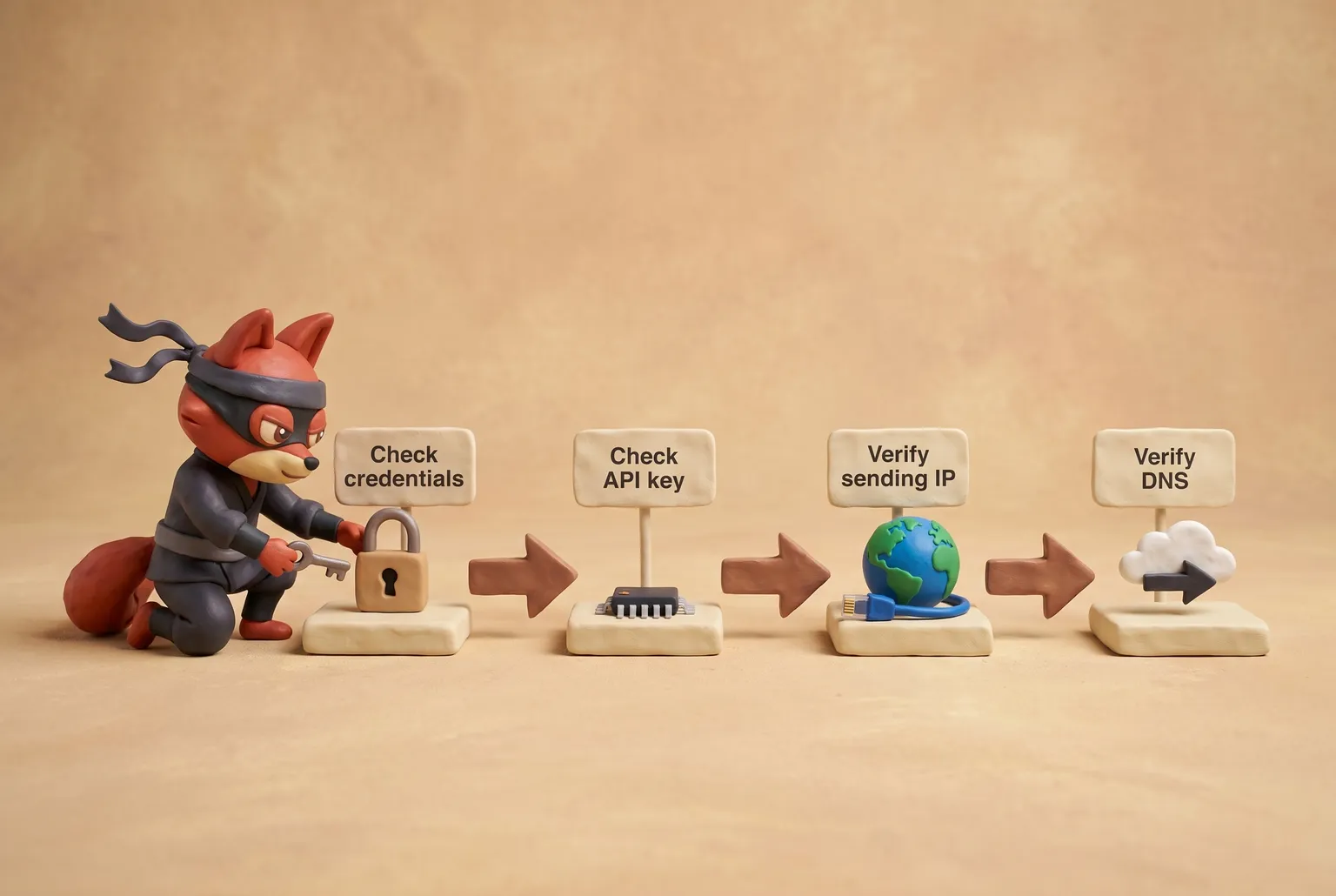
A missing SPF, a DKIM signature mismatch, or a DMARC policy that quarantines unauthenticated mail can all trigger a 550 on relays that enforce authentication. I once wasted an hour tracing a 550 that read “Authentication required” while a key had expired silently. The logs pointed to a credentials problem, but I kept suspecting DNS.
421 Service Not Available A 421 signals rate limiting. You’ve hit a sending cap, either on volume or connection frequency. The reply often includes a retry-after timestamp. Throttle throughput and spread the next batch over a longer window. On shared IP pools, a 421 is more likely during peak hours when aggregate traffic surges.
552 Message Size Exceeded The entire message, headers plus encoded body and any attachments, exceeds the relay’s limit. Most relays cap around 25 MB. A bloated HTML newsletter with embedded high-resolution images can cross that line fast. Trim the design or host images on a CDN instead.
Field note: The exact 550 text matters: 5.1.1 user unknown means the mailbox no longer exists; a bare mailbox unavailable means a policy rejection, not a dead address. Suppress only after the same 550 repeats.
Blacklisted IP or Domain A 550 or 554 that names an RBL means the relay is refusing mail because of a listing, not because of your message. Go to the named RBL's site and check the exact listing. Each list has its own removal process; the listing page shows which one applies. Submit any removal request only after you fix the underlying issue. Otherwise you're back on the list before the delisting completes.
Integration Quick Hits for CRM and E-commerce Automation platforms plug SMTP directly into a workflow. In Zapier, search for the “New Lead in CRM → Add Contact to SendGrid” template. It drops every new lead into a SendGrid contact list over SMTP, no code. For WooCommerce, a webhook from the “Order Completed” trigger to Mailgun’s SMTP endpoint sends a confirmation email the moment payment clears. Configure both once, and every new address flows through the relay without manual uploads or script edits.
Read the reply code, fix the root cause, and I’ll have you sending again inside an hour.
Key takeaways
- SMTP email marketing works because it is accepted by every mailbox provider. No API lock-in, just plugging credentials into any compatible tool.
- Publish SPF, DKIM, and start DMARC in monitor mode before your first send; missing any one record will keep your emails out of the inbox.
- Mailgun also offers campaign dashboards.
- Validate addresses with an API call before hitting the SMTP server; catch‑all, disposable, and invalid addresses spike bounce rates and destroy your sender reputation.
- Monitor Google Postmaster Tools, complaint rates, and blacklist checks weekly. A single spam trap can drag your domain onto blocklists.
I tested a failing SMTP session that returned a 550; the root cause was a mismatched DKIM signature, and correcting it immediately restored delivery.
Frequently Asked Questions About SMTP Email Marketing
How is SMTP different from an email API?
SMTP is a universal postal service that any mail server understands, no code needed. An email API is a provider-specific wrapper that gives you event webhooks, template management, and analytics in exchange for tighter integration. SMTP wins on portability: swap credentials and you’re done. APIs win when you need real-time delivery data and dynamic personalization. The tradeoff is lock-in versus deeper control.
Why are my SMTP marketing emails going to spam?
Spam placement usually starts with DNS authentication gaps: an SPF record that omits your sending relay, a DKIM key that doesn’t match, or a DMARC policy set to p=reject without an aggregate report address. Even with perfect DNS, sending to stale or spam-trap addresses spikes your complaint rate and pushes mail to the junk folder.
Check your bounce rate in your relay dashboard and your spam rate in Google Postmaster Tools. Run a mail-tester test; it flags authentication gaps in seconds. Then validate every address before the next send.
Field note: One unvalidated list can plant spam traps across your send stream, and even flawless authentication won’t protect the domain from the resulting reputation hit.
Can I use SMTP for free email marketing?
Yes. SendGrid’s free tier allows 100 emails per day forever. Mailgun’s Flex plan offers 100 emails per day. Amazon SES gives you 3,000 messages per month for 12 months when sending from outside EC2, or 62,000 per month from EC2. SMTP2GO includes 1,000 emails per month on its free tier. Free plans rarely include dedicated IPs, advanced analytics, or priority support, so they’re fine for testing but become a bottleneck once your list scales past a few thousand subscribers.
What is the best SMTP port for email marketing?
Port 587 with STARTTLS encryption is the standard for outbound email submission and should be your first choice. Port 465 with implicit SSL is also widely supported and works if 587 is blocked. Avoid port 25 entirely; most ISPs block it to prevent spam from consumer-grade connections, and using it will cause connection rejections from major relays.
How do I warm up a new SMTP IP address?
Set day-one send volume to 50 messages aimed at your most active recipients. Increase the cap every three days, doubling only if bounce and spam complaint rates stay flat. You’ll typically reach full marketing volume in about 30 days. Keep an eye on domain reputation in Google Postmaster Tools throughout the ramp. Blasting thousands from a brand-new IP invites throttling and spam folder placement that can take weeks to recover from.
Do I need to validate emails before sending via SMTP?
Yes. Invalid addresses produce hard bounces, and those bounces degrade the reputation of your sending domain. Use an email verification API such as Verifox to validate addresses at signup or before a bulk upload. The API strips out invalid, disposable, and high-risk contacts before they reach your SMTP relay. Each verification runs under a cent, while a single bounce can throttle your sends and sink an entire campaign.
Readers working through this usually run into smtp email marketing meaning, what causes a smtp email marketing and smtp its role as well, so they are worth understanding alongside the main topic.
Conclusion
The troubleshooting section covered DNS-blocked sends and port selection. But every failure scenario traces back to what your SMTP relay heard before it ever said HELO: a bad address.
I walked through SMTP settings for Mailchimp, HubSpot, and custom relays, the three DNS records that authenticate your sends, a comparison of SendGrid, Mailgun, SES, and SMTP2GO, the reputation loop of Postmaster Tools, blacklist checks, and complaint monitoring, and the bounce codes that point to the broken link - but none of that matters unless you validate every address before you hit send.
Success in SMTP email marketing in 2026 comes from technical hygiene, not from chasing the lowest per-email rate or tweaking subject lines. Validate every address before you hit send, configure SPF/DKIM/DMARC completely, and monitor reputation like you monitor uptime.
That stack starts with email verification. Verifox’s free tier lets you clean your next list before your next SMTP campaign. Start my validation run, and keep your sender reputation strong from the very first connection.
Key takeaways:
- When I’m cleaning a list for a client
- The SMTP host and port get your connection live.
- What's the point of perfect authentication if a mailbox provider still
- Validate the email address before your SMTP server ever opens a
- SMTP stands for Simple Mail Transfer Protocol.

I'm an AI researcher and founding engineer focused on what happens after the base model: grounding, evaluation, human control, and reliable deployment. At Harvard Business School's AI Institute, I build research platforms and LLM measurement pipelines: a six-condition human-AI negotiation experiment platform, and an LLM pipeline that mapped problem statements from 88,000+ startups, validated against 331 founder interviews. Previously I built the agent backend and real-time voice AI for CareCorgi (FastAPI / Gemini / GCP), and co-founded Zumer, an externally audited DeFi protocol on Ethereum mainnet. The common thread: turning ambiguous human problems into instrumented AI systems with structured outputs, behavioral evaluation, and production safeguards. First-author publications at CHI and CHIWORK. Open to Applied Scientist / AI Engineer roles.